What an ICS file contains, and which data you hand over with every invitation
October 27, 2026 · by Calendar Butler · 8 min read
Behind every calendar invitation sits a text file that often reveals far more than date and time, and whoever forwards it forwards everything it contains.
Almost every invitation to an appointment, whether from Outlook, from Google or from a video conferencing platform, comes with an attachment that hardly anyone ever opens, namely a small file with the ending .ics. For most people it is nothing more than the thing that gets the appointment into the calendar, and because everything happens by itself, hardly anyone asks what is actually inside.
Create a photorealistic image in 3:2 format: An open laptop on a light wooden desk, on whose screen many lines of plain text from a calendar file can be seen in a simple text editor, next to it a coffee cup and an open notebook, soft daylight from the side, main subject in the center, no stock photo look, no legible text in the image.
Yet an ICS file is no magic, it is a text document that can be read with any text editor, and as a rule it contains considerably more than the single line you later see in your calendar. Anyone who works with several clients and has to move appointments from one calendar to another decides with every forwarding who gets to see this information, usually without knowing that they are deciding anything at all.
This article therefore opens such a file once, line by line, shows which data you hand over with every invitation, and answers the question of what another calendar actually needs in order not to book you twice.
A standard every calendar understands
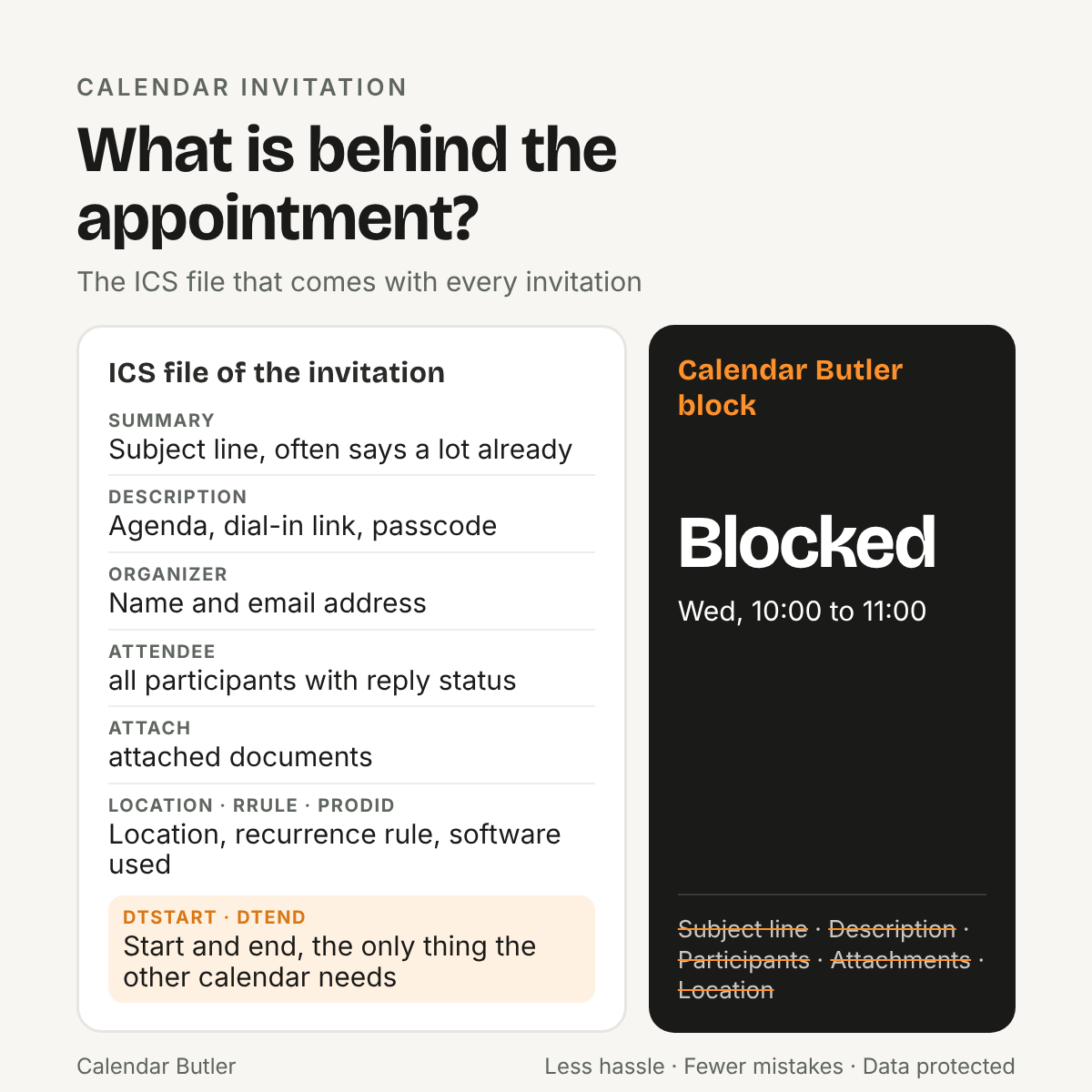
The format is called iCalendar, it has been described since 1998 and exists today in the version RFC 5545, and it is the reason an appointment from Outlook can land in Google, in Apple’s calendar and in almost any other program. An ICS file begins with the line BEGIN:VCALENDAR, inside it sit one or more events, each between BEGIN:VEVENT and END:VEVENT, and every property of an appointment has its own line with a fixed name.
Because the format is open and plain, it works everywhere, and because it is so plain, it also knows no secrecy. There is neither encryption nor any way to black out individual fields, only lines that are in the file or are not, and an invitation travels through the network as an attachment or as an embedded part of the message. Whoever receives the message therefore receives everything the sender wrote into it.
What is in there, line by line
A typical event first contains the details you would expect, namely title, start and end including time zone, the location and, where applicable, a rule for repetitions as it occurs with recurring appointments. In addition there are details that you rarely see in the calendar but find in the file, such as a unique identifier of the appointment that makes sure later changes and cancellations are assigned to the right entry, and a version number that counts how often the appointment has been changed.
The most revealing lines are the ones about people. The organizer is in there with name and email address, and every participant gets a line of their own that often contains, besides the address, the display name and the status of the reply, that is, whether the person has accepted, declined or not reacted at all. On top of that there is a line that reveals which software created the file, and with Outlook and Exchange there are also vendor-specific extra fields beginning with X- that carry, for example, a formatted version of the description.
An invitation has a life: request, change, cancellation
An invitation is not a one-off, it is the beginning of a small story. The first file carries the method REQUEST and invites to the appointment, every later postponement arrives as a new file with the same identifier and a higher version number and replaces the old entry, and a cancellation arrives as a file with the method CANCEL that removes the entry with that identifier again. Replies from participants travel back as REPLY, and that is how a calendar program recognizes without any inquiry whether an appointment is new, changed or cancelled.
From this follows something that can become expensive in everyday work, because a retyped copy has no identifier and therefore no connection to the original. If the client cancels the appointment, your copy stays in the other calendar and blocks a time that has long been free again or, worse still, it is not carried along when the appointment is moved and lets an appointment slip into a slot where you are long since sitting somewhere else. Manual upkeep is therefore not only tedious, it separates every copy from its origin and makes the mistakes invisible until someone notices them.
Subject line and description reveal more than you think
The subject line is the field everyone sees, and when forwarding it is underestimated most often because it looks so inconspicuous. Yet it often tells a whole story already. If an invitation says “Budget planning crisis meeting”, everyone who reads it knows that something is on fire at this company or in this project, and they learn it without opening a single line of the description. Subject lines such as “Restructuring northern site”, “Due diligence” or “Supplier talks escalation” reveal the state of a project, negotiations that are not yet public and sometimes the standing of an entire company, and at listed companies something like that can even be price-sensitive.
The second field with great weight is the description. For video conferences it holds the dial-in link, the meeting ID and often the passcode as well, along with the agenda, notes on preparation and sometimes sentences that were only meant for the invitees, for example who is to send documents beforehand or what the matter is really about.
An often underestimated part is the attached documents, because an invitation can carry an agenda, a draft contract or a presentation either as a link or directly in the file, and when forwarding hardly anyone thinks of the fact that they travel along.
Whoever forwards such an invitation to another client therefore gives them not only a time but possibly a working access to somebody else’s meeting, the name of the project, the name of the client and the list of people you are sitting at the table with that day. For consultants who work for competitors, the mere fact that a connection to a particular company exists is information that many contracts treat as confidential.
Whoever forwards an invitation forwards the entire file.
Calendar Butler
How invitations travel on in practice
In practice this rarely happens out of ill will, it happens out of lack of time. You forward the invitation so that the other calendar knows the appointment, you import the file into your private calendar, or you retype the appointment and leave out the title because you sense that it does not belong there. Each of these three ways has its price, because forwarding takes everything along, importing deposits the details where they do not belong, and retyping costs time and creates mistakes because every postponement and every cancellation has to be followed up in several places.
Even the marking “private” helps only to a degree, because it stands in the file as a property that a receiving program can take into account but does not have to, and whether the participant list and the description actually stay hidden depends on the respective calendar system. From the point of view of a compliance department that is not a reliable safeguard but a hope.
What another calendar really needs
The question that is almost never asked in this chain is what the other calendar needs the appointment for in the first place. The answer is unspectacular, because it is meant to know that you are not available at that time so that nobody puts an appointment into your time. Start, end and a marking as busy are enough for that, and everything else in the ICS file, that is subject line, description, location, participants, attachments and software line, is ballast for this purpose, which is of no use and in the worst case does damage.
This is exactly how Calendar Butler works. It is invited to the appointment like one more participant, reads the invitation once, takes date and time from it and creates its own neutral block in your other calendars, which carries its own identifier and appears only as “Blocked”. The description, the participants and the location of the original appointment go nowhere on this path, and because the block is a file of its own, it follows a postponement or cancellation of the appointment without you having to check on Sunday evening whether anything has moved since Friday.
If you want to know what is inside your own invitations, save the next ICS file and open it with a simple text editor instead of with your calendar. You will probably be surprised how much you find in it about your client, their colleagues and their software, and the answer to the question of who you want to forward such files to in future usually comes more easily afterwards.
Sources
RFC 5545: Internet Calendaring and Scheduling Core Object Specification (iCalendar). rfc-editor.org
 Calendar Butler